Features
Everything included in Admin Portal v10.3.0 — grouped by area.
Feature Highlights
 app.yourdomain.com/adminReal screenshot
 app.yourdomain.com/dashboardReal screenshot
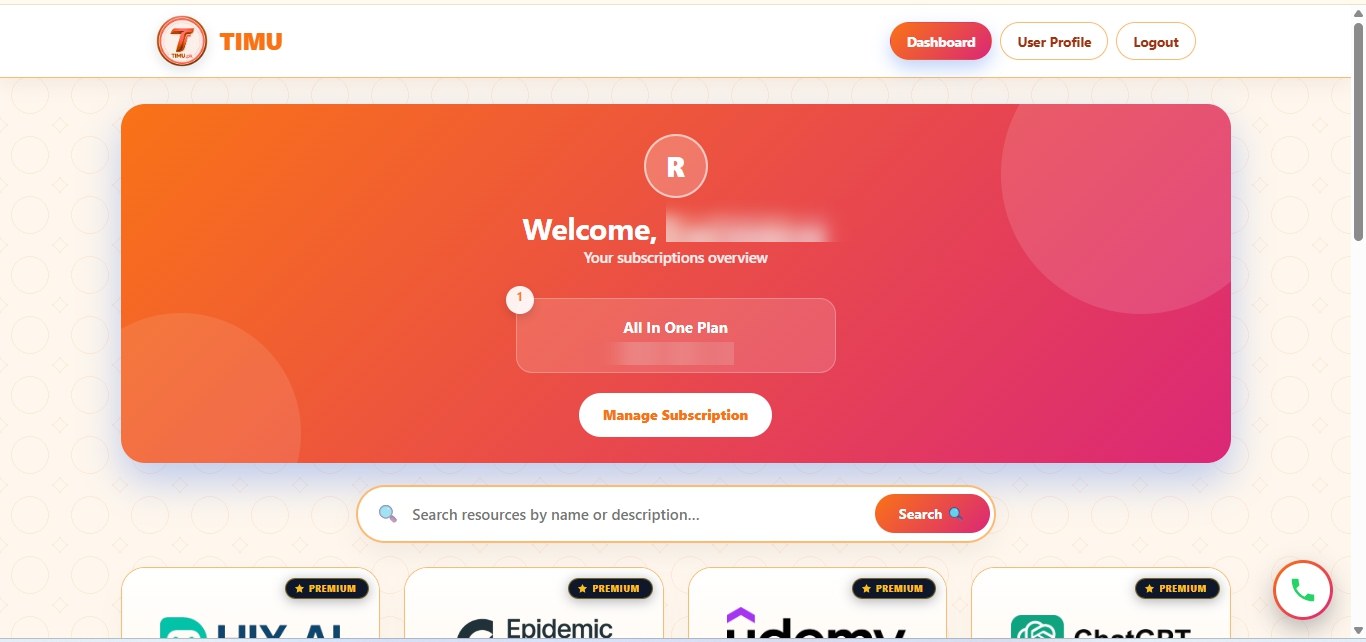 special.yourdomain.comReal screenshot
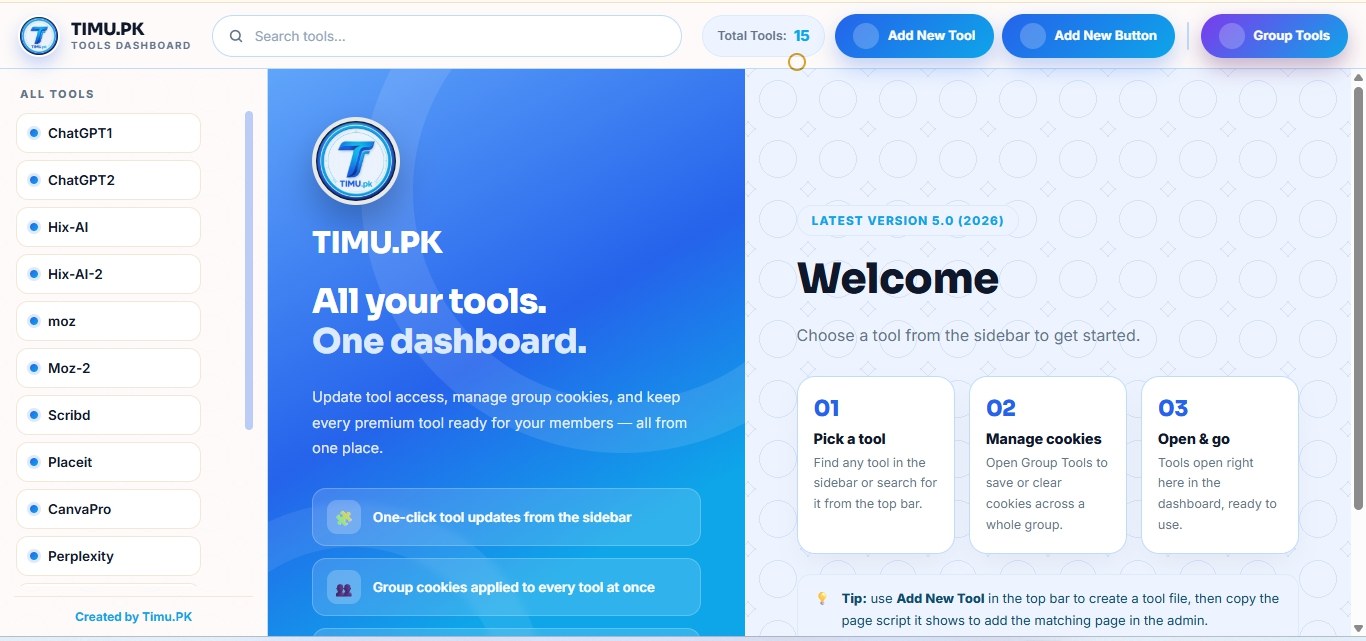
Admin
aMember-Style Admin Panel
Dashboard, Browse Users, Products, Protect Content, Configuration, Helpdesk, Reports and expiry lists — the aMember-style sections and workflow, in a standalone portal with no aMember needed.
Protect Content
Pages, Folders, Files, Videos, Import Content and Categories — protect any content by product and control exactly who can see it.
Helpdesk, Email & Newsletters
Helpdesk tickets with FAQ answers and ticket queues, E-Mail Messages, E-Mail Templates, Newsletters, Agreement Documents and the Forms Editor.
Coupons, Control & Reports
Coupons, Admin Access Control, Admin Access Duration, Blocking IP/E-Mail, Reports, Utilities, Admin Accounts, Add-ons, One Time Offer, Links and User Menu.
Members
Signup & Login incl. Google
Members sign up and log in with email or Google, with remember login, terms acceptance and clean URLs.
Member Dashboard & Tool Cards
A clean dashboard with tool cards and search, subscriptions overview, profile, support tickets, file downloads and protected folders.
My Subscriptions & Profile
Members see every plan and tool they hold with expiry dates, manage their profile and extra fields, and open helpdesk tickets from the member area.
Security
Single Login Session & Alerts
One active login session per member, session timeouts, brute-force alerts, and notices when a new login ends another session.
Guard & Content Protection
Right-click, DevTools and copy protection on member pages, plus folder protection that keeps your content safe.
Guided Installer & Demo Content
A step-by-step wizard (your key, requirements, MySQL, site, admin account) creates all tables automatically and includes a demo Netflix tool and test member so you can check the full flow at once.
Panels
Tool Update Panel
Tool session buttons, groups, add new button/file, update pages and delete tool — manage every tool session from one place.
Tool Access Page
Gated tool pages served only to entitled members through the extension. Update-soon fallback page included.
Extension
Chrome MV3 Extension
The browser extension is auto-converted to your brand and domain at install time — for example SmmtecTools for smmtec.com — and added to Files automatically.
Themes & Appearance
One-Click Theme Presets
12 ready-made presets — Ocean Blue (default), Emerald, Purple, Rose, Teal, Midnight, Navy & Gold, Sunset, Forest, Crimson, Sky and Blush. Pick one and the whole portal restyles at once.
Custom Colors
Pick Custom Colors and set every colour yourself with colour pickers. Editing any colour switches the preset to Custom automatically, so your choices are never lost.
Header Colours
Header background and header text colours, set separately from the rest of the page.
Layout Colours
Page background, card background, panel background, border colour, heading colour, text colour and muted text — each with its own picker.
Footer & Dashboard Colours
Footer and dashboard areas have their own colour settings, grouped by page area so you always know what you are changing.
Background Styles
A background-style dropdown changes the page background pattern for the whole portal — patterned backgrounds such as Topo Rings.
Site Logo
Upload your own logo (PNG, JPG, GIF or WebP, up to 2 MB) or paste an image URL. An uploaded file wins over the URL, and a custom logo shows exactly as uploaded.
Theme Applies Everywhere
One theme for the whole portal: your preset or custom colours apply to the login page, signup, member dashboard, tool pages, profile and info pages — including pages you add later.
Themed Login Page
The login page uses the same theme — Sunset shows a cream background with an orange-to-pink gradient button, matching the member dashboard.
Admin Sections Included
The admin panel follows the aMember-style layout and workflow, with these sections:
Dashboard
Last 10 customers, recent activity, a users-report chart and a six-step setup guide.
Browse Users
Search, view and edit every member; login-as-user, grants, profile fields and status.
Reports
Reports on users, payments and activity.
Products: Manage Products
Create plans and single tools: title, description, image, link, slug, type, sort order, category and billing plan.
Products: Coupons
Discount coupon codes for plans and products.
Protect Content: Folders
Protect whole folders by product, with drag-and-drop ordering and gate status.
Protect Content: Files
Protect downloadable files by product — the branded extension download lives here.
Protect Content: Pages
Protect pages by product, assign templates and gate modes, with bulk actions.
Protect Content: Import Content
Import content into the protection system in bulk.
Protect Content: More Tabs
Integrations, E-Mail Messages, Links, Video, Newsletters and Content Categories tabs for every content type.
Configuration: Global
Site title, site logo, root URLs, clean URLs, admin email and tax settings.
Configuration: Dashboard Control
The theme system: 12 one-click presets, custom colours per page area and background styles.
Configuration: Single Login Session
How many devices a member can use at once, session timeout, and login and brute-force alerts.
Configuration: Setup Pages
Plugins, E-Mail, E-Mail Templates, SMS, Advanced, PDF Invoice, Appearance, Agreement Documents, BuyNow Buttons, Add User Fields, User Menu, Email Layouts, Blocking IP/E-Mail, Countries/States, Admin Accounts, Change Password, Solid Color Theme, Footer and Offline Payment.
Configuration: Add-ons
11 built-in add-ons — Expiry Reminders, Single Login Session, Terms Agreement, Analytics Snippet, WhatsApp Required (Admin), Admin Access Control, Admin Access Duration, One Time Offer, Helpdesk, Newsletters and Custom User Fields — each enabled or disabled with one click.
Configuration: Forms Editor
Signup and profile form layout and fields.
Helpdesk
Member support tickets, FAQ answers and admin ticket queues.
One Time Offer
One-time offers shown once after signup or a new grant.
Expiring Tomorrow / Expired Today
Members expiring tomorrow or today, with automatic expiry-reminder emails.
Active / Expired / Pending Lists
One-click filtered member lists: all active, active over a month, all expired and all pending.
Admin Access Duration
Expiry dates for admin accounts — expired admins cannot log in.
Admin Access Control
Product restrictions and the one-month grant limit for non-super admins.
Utilities
Maintenance tools and data tasks for the portal.
Help & Support
Help and guidance for admins.
Requirements
- PHP 8.0+ with pdo_mysql, json, hash, mbstring, zip, sodium and curl
- MySQL / MariaDB database (the wizard creates the tables automatically)
- 3 subdomains with SSL: portal + exactly "special" + "access"
- Apache with mod_rewrite recommended for clean URLs
Full steps: Installation Guide · Flows: How It Works